Moovv1.0.38

Mass VMware migration to Proxmox, KVM and HPE VM Essentials using Veeam backups.

Moov migrates virtual machines from Veeam Backup & Replication restore points onto Proxmox VE, oVirt / OLVM / RHV and HPE VM Essentials, without touching the source VMware vSphere environment during the migration.

  • 3
    migration targets
  • ≤ 60 s
    RTO with Instant Migration
  • 0
    connections to vCenter or ESXi
VMware vSphere
out of scope
Veeam Backup & Replication V13
source: restore point
Moov appliance
core + disposable helpers
customize · NBD · pivot
  • Proxmox VE8.x / 9.x
  • oVirt / OLVM4.5+
  • HPE VM EssentialsMorpheus 8.1.x · 9.0.x
Supported targets
Proxmox VE
8.x / 9.x

Full support, including automatic API-token bootstrap.

oVirt / OLVM / RHV
4.5+

REST + imageio upload; SSH/QMP for instant migration.

HPE VM Essentials
Morpheus 8.1.x · 9.0.x

Instant and cold migration onto MVM nodes.

Source: Veeam Backup & Replication V13 REST API.

How it works

A Core appliance plus disposable helpers on the target hypervisor.

The source of every VM is Veeam: REST metadata or the published backup disk. Moov never connects to vCenter or ESXi.

  • 01
    Pre-flight Inspector

    Scans Veeam backups, classifies each VM (OS, disks, VirtIO readiness) and estimates the capacity needed.

  • 02
    Wave planning

    The operator plans a wave in the web console and picks a target host and migration mode per VM.

  • 03
    Publish and dispatch

    The Core publishes the restore point from Veeam and dispatches the work to a helper, which serves the disk over NBD and drives the conversion or boot.

  • 04
    Boot and pivot

    Progress streams live to the console; the VM boots, the guest agent comes online and, for instant migration, the disk pivots to local storage.

VMware vSphere
out of scope
Veeam Backup & Replication V13
Backup repository · VBK / VIB
SOURCE
Moov Appliance
moov-core — web console · REST API (:9093)
orchestrator · embedded SQLite · local CA · mTLS
moov-helper — local helper
PRIMARY
Operator
web browser
HTTPS :9093
mTLS · gRPC
Additional helpers
HELPER
Same appliance image
Horizontal scaling of the migration
REST / SSH / libvirt
Migration targets
  • Proxmox VE
  • oVirt / OLVM / RHV
  • HPE VM Essentials
Active data flowManagement / consoleOut of scope
Architecture: Veeam source, Moov appliance (core + local helper), additional helpers and migration targets.
Migration modes

Two modes, depending on how much downtime each VM tolerates.

IVMR

Instant VM Migration

RTO · ≤ 60 s to boot

For critical VMs. The VM boots immediately on the target from the backup (iSCSI/NBD) while its disks migrate in the background. When the mirror completes, the pivot leaves it running entirely on target storage.

Cold

Cold Migration

RTO · 15 to 60 min per VM

Copies the disks to the target and leaves the VM created and powered off, so the operator boots it in their own window. No backup dependency at boot time.

Wave Engine

Both modes run through the Wave Engine, which schedules many VMs concurrently with per-helper capacity limits derived from the host's CPU and RAM: roughly 1 vCPU and 2 GiB per VM, with global capacity being the sum of the fleet.

No vSphere dependency

The source of every VM is Veeam. Moov never connects to vCenter or ESXi.

Drivers built in

VirtIO drivers are prepared automatically for Linux and Windows guests, including modern Windows using inbox drivers.

Network preserved

Static IPs and multi-NIC layouts are carried over to the migrated VM, or reassigned per NIC from the console.

Runs as an appliance

A self-contained image with a first-boot wizard and a web console. No external identity provider or database to stand up.

VM preparation

The Virtual Machine is made KVM-ready before it boots.

The customize stage runs offline against the mounted disk, with no auxiliary appliance and no KVM on the helper, adapting the guest OS so it boots and operates on the target.

customize · virt-v2v in-place
  • VirtIO driver injection

    vioscsi / viostor are installed during preparation, on Windows and Linux. The injection creates the VirtIO evidence that enables the virtio-scsi bus.

  • IP address preserved

    Static IPs are applied to every interface according to each NIC's PCI slot (multi-NIC Windows and Linux), or reassigned per NIC from the console.

  • VMware Tools removal

    vSphere's VMware Tools are uninstalled so they don't compete with the KVM drivers and agent.

  • QEMU Guest Agent

    QGA is prepared during customize; its ping response confirms the migrated VM is alive and enables IP queries, fsfreeze and command execution.

  • virtio-scsi disk bus

    The paravirtualized controller becomes the default bus when there is evidence of VirtIO support in the guest, outperforming SATA/IDE.

  • Boot repair

    BCD fixup on Windows, plus seeding or repairing the ESP partition when the guest boots via UEFI.

  • Sparsify optimization

    Empty or zeroed blocks are discarded during conversion, cutting size and transfer time.

  • Target agent

    On HPE VM Essentials the Morpheus agent is installed post-pivot through the QEMU Guest Agent's guest-exec.

Quickstart

From deployed appliance to multiple VMs running in ~20 minutes.

Minimum end-to-end run. Prerequisite: the appliance imported and powered on, with network access to the Veeam server and the target hypervisor.

  1. 01
    First boot and login

    Complete the text wizard (Primary role, network, hostname, time, admin account). Note the CA fingerprint and the recovery code.

  2. 02
    Connect Veeam

    Under Connections → Veeam, add your Veeam B&R V13 server and test the connection until the status is healthy.

  3. 03
    Add a target

    Under Connections → Targets, add Proxmox VE, oVirt or HPE VM Essentials. The wizard bootstraps credentials automatically.

  4. 04
    Deploy a helper

    Pick the target and accept the defaults (8 vCPU / 16 GB / 50 GB). The helper registers over mTLS and becomes Active.

  5. 05
    Preflight one VM

    Scan the Veeam catalog, pick one VM and run the disk and hardware analysis. Confirm it lands in the Automatic bucket.

  6. 06
    Launch one Instant Migration

    Three-step wizard: source and VM, target and mode, placement (node, storage, network). The VM boots straight from the backup.

  7. 07
    Verify the booted VM

    Follow live progress: per-VM timeline, per-disk progress and event log. Once the pivot completes, the VM runs entirely on the target.

The console

The whole flow from one web console.

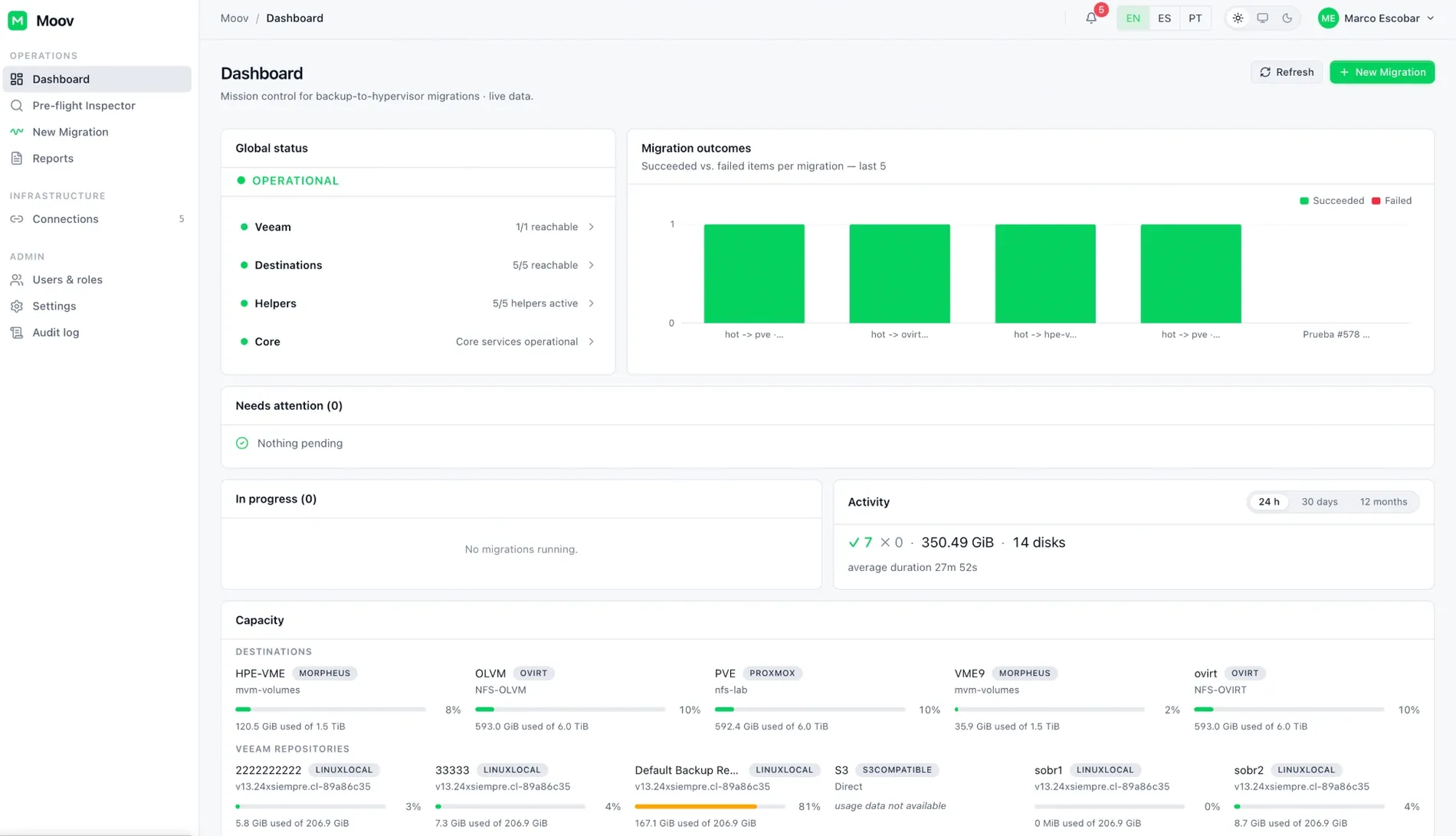
Dashboard: global status, outcomes of the latest migrations and capacity per target.Dashboard: global status, outcomes of the latest migrations and capacity per target.
Dashboard: global status, outcomes of the latest migrations and capacity per target.
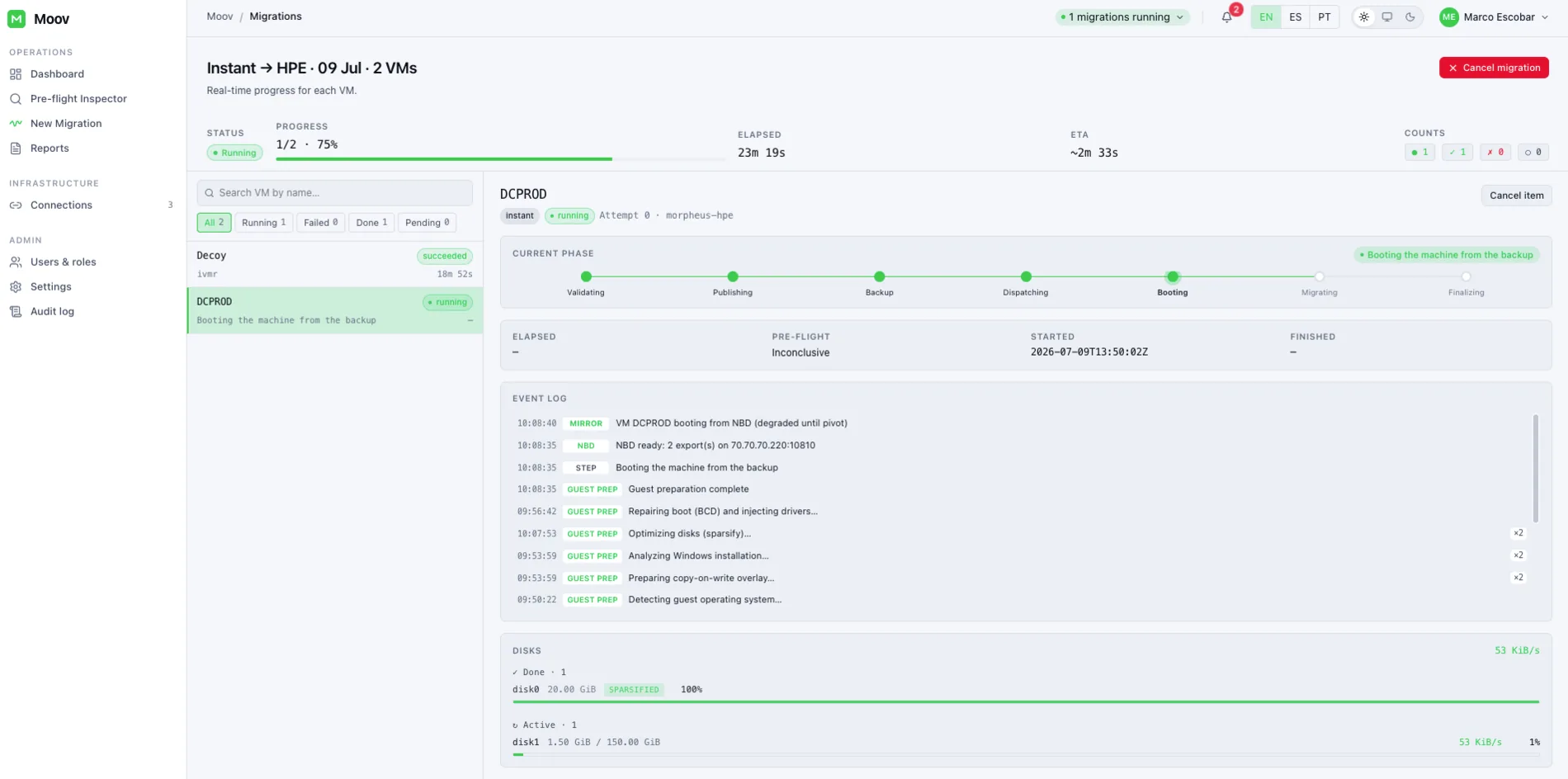
Live migration: per-disk progress and event log.Live migration: per-disk progress and event log.
Live migration: per-disk progress and event log.
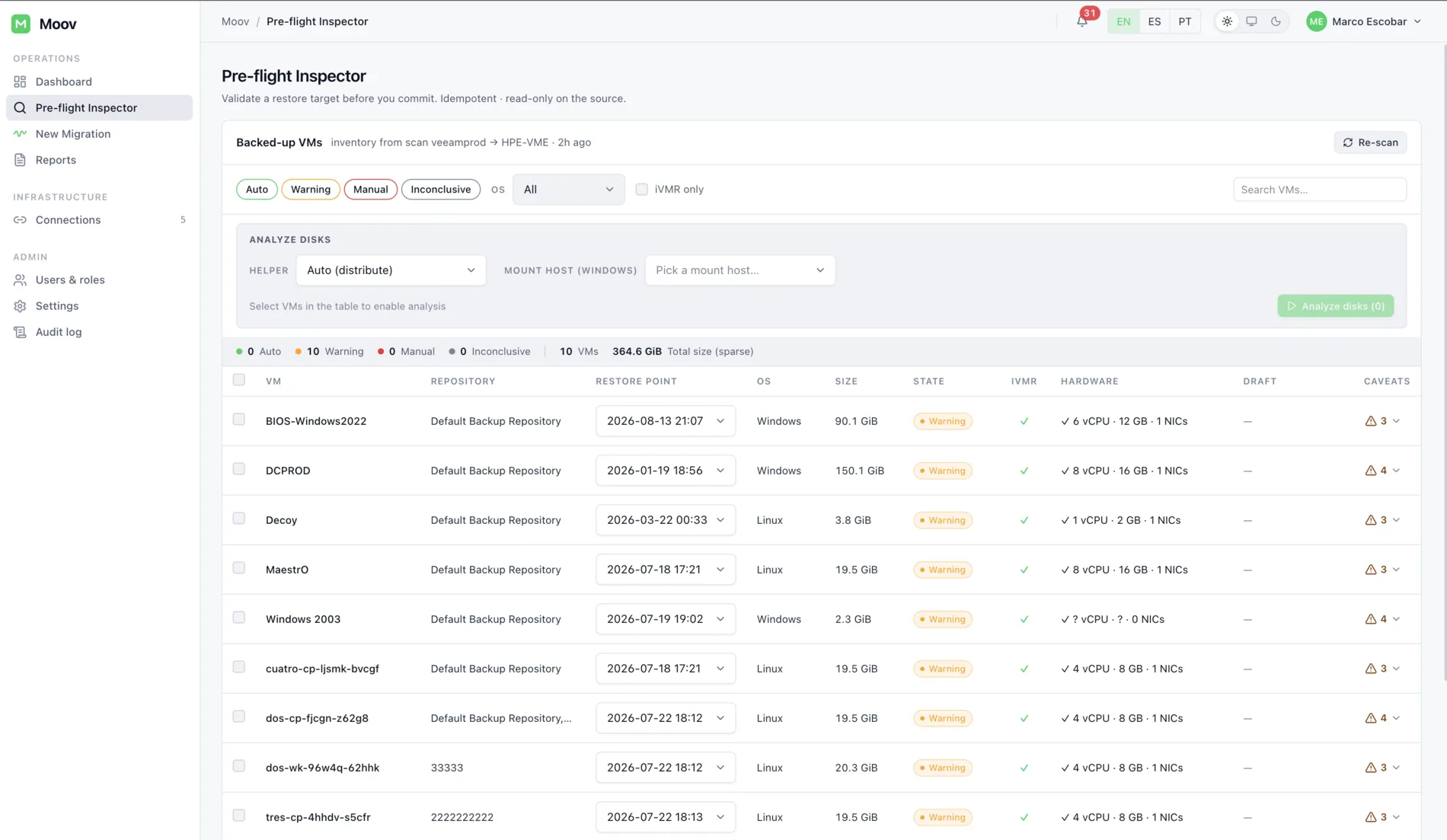
Preflight: Veeam catalog inventory and per-VM classification.Preflight: Veeam catalog inventory and per-VM classification.
Preflight: Veeam catalog inventory and per-VM classification.
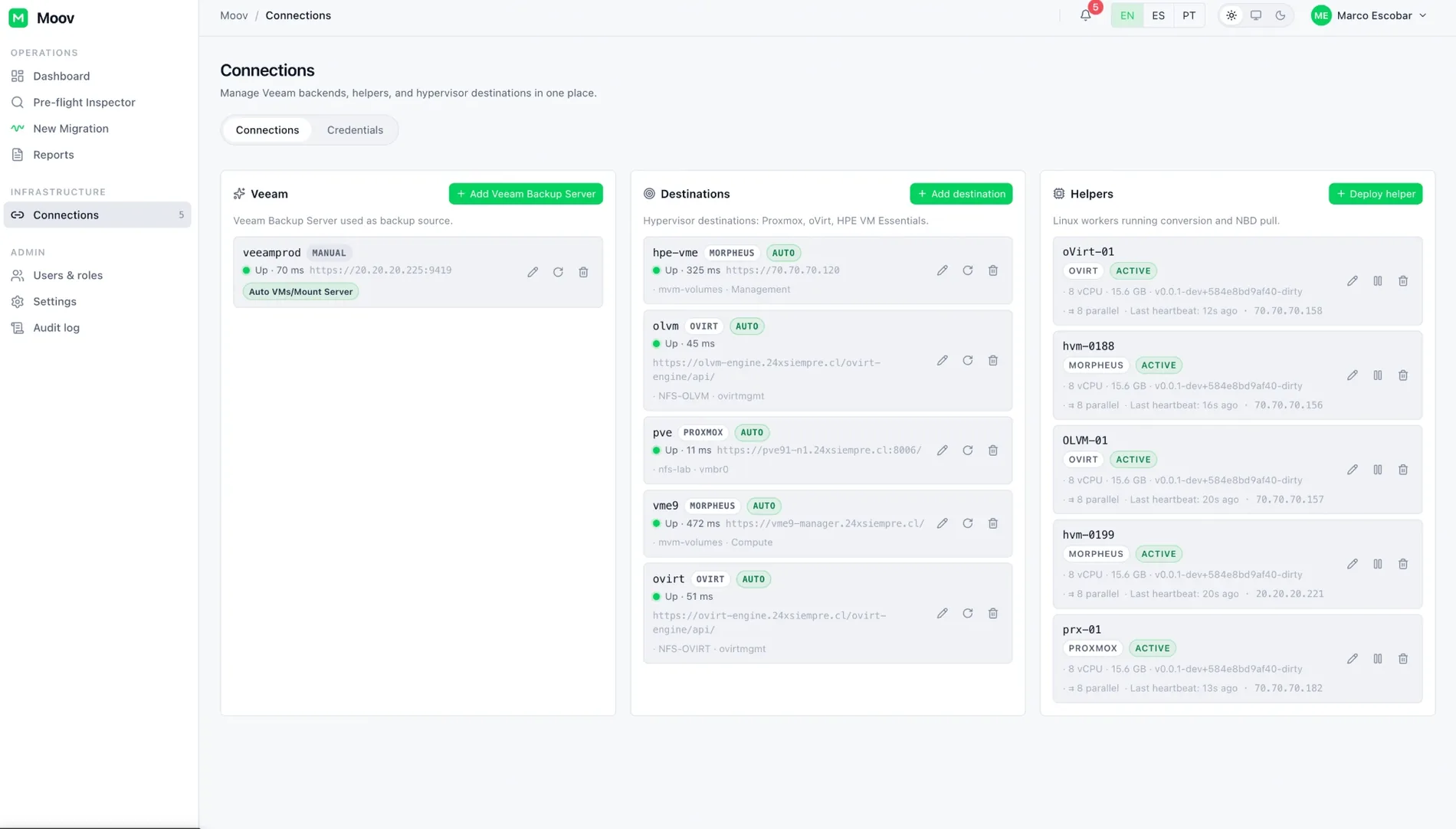
Connections: Veeam, targets and helpers with automatic bootstrap.Connections: Veeam, targets and helpers with automatic bootstrap.
Connections: Veeam, targets and helpers with automatic bootstrap.

Security

Encrypted credentials, mTLS between components, no external IdP.

  • Local authentication

    Passwords hashed with bcrypt, sessions with signed JWT and role-based access control. No external identity provider required.

  • Encrypted credentials

    Credentials encrypted with AES-256-GCM. The master key is shown once at bootstrap as a recovery code: that code is the key, so it must be kept with the same care.

  • Helpers over mTLS

    Helpers authenticate to the Core with mutual TLS via single-use registration tokens.

  • Verified artifacts

    Base image, VirtIO and guest agents are checksum-verified on download.

Updates

The appliance updates itself, and its fleet of helpers.

Since v1.0.38 updating happens from the console: the appliance verifies, applies and, if anything goes wrong, returns to the previous version on its own. No reinstall, no recreating helpers.

  • Signed bundles

    Every update is signed with Ed25519 and carries a SHA-256 per file. The privileged boundary re-verifies signature and hashes before applying anything.

  • Two channels

    Moov binaries and operating-system patches update separately, each with its own state in the console.

  • Automatic rollback

    If the new Core cannot prove it is healthy, the appliance rolls back to the previous version without operator intervention.

  • Fleet in step

    The appliance mirrors the Debian archive for its helpers and restarts hosts from the same table. Core and helpers must end on the same version.

Releases

What changed in the latest versions.

See the full changelog →
v1.0.38Latest

In-place updates and staging-free Cold migration

Supersedes v1.0.37. Introduces in-place updates from the console (signed, verified and reversible) and removes the full local copy from the Cold migration path. Every helper must be updated together with the appliance: the Core refuses work from helpers older than 1.0.38.

  • Updates signed end to end. Ed25519 bundles with per-file SHA-256, two channels (Moov binaries and the operating system) and automatic rollback if the new Core cannot prove it is healthy.
  • Cold without staging. The helper serves the source disk directly and the hypervisor pulls from it, removing a whole copy of the VM from both elapsed time and helper disk. Cold leaves the VM powered off for your own window.
  • Guest networking on the right NIC. Binding is done by PCI topology; Windows guests with a static IP reliably come back with it instead of falling to DHCP.
  • Progress you can trust. All three hypervisors report real transferred bytes, measured before the copy starts. Dates follow the appliance's configured timezone.
  • Fleet-wide OS patching. The appliance mirrors the Debian archive for its helpers, with host restarts from the same table and an honest state when a host could not be measured.
  • Source and target alerts. A Veeam server or hypervisor that stops responding now raises a notification after two consecutive failures, deduplicated for 30 minutes.
  • Preflight. Repository selection and pagination for large inventories; VM image backups only, with object storage and hardened repositories classified correctly.
  • Security. Four audits closed: the privileged boundary re-verifies signatures and hashes on its own, and SSH host-key pinning is enforced on every path.
v1.0.37Previous

First public release

The version shipped to the community on VeeamHub, validated end-to-end against all three hypervisors with instant and cold migration, Linux and multi-NIC Windows guests and concurrent waves.

  • OWASP/ASVS audit with medium-severity findings closed and cargo audit at zero.
  • Live console: preflight reflects progress started in another tab, cancellation survives a refresh, and the dashboard shows real per-disk progress.
  • Helper TUI console on the hypervisor screen: status, registration and running jobs.
  • Multi-NIC static IP on Windows applied to every interface, matched by MAC.
  • Cold Migration available on Proxmox, oVirt and HPE VM Essentials.
  • Mount Server in automatic mode based on repository tasks, preferring helpers on the target hypervisor.

Frequently asked questions

Do I need vCenter or ESXi access?

No. The source of every VM is Veeam, through REST metadata or the published backup disk. Moov never connects to the vSphere environment.

Which Veeam version is required?

Veeam Backup & Replication V13, through its REST API and the Data Integration API that publishes disks without modifying the backup.

Which Veeam license do I need?

Moov works with Veeam Data Platform in its Foundation, Advanced and Premium editions, under Veeam Universal License (VUL). Evaluation and NFR licenses also work, since they are full-featured by default. Veeam Backup & Replication Community Edition is not supported.

How much downtime does a critical VM take?

With Instant VM Migration the VM boots on the target from the backup (stated RTO ≤ 60 s) and later pivots to local storage with no extra window.

What about Windows drivers?

VirtIO drivers are injected automatically during customize, including modern Windows with inbox drivers and Windows Server 2025.

How many VMs can migrate at once?

The Wave Engine schedules concurrent waves; each helper runs as many VMs in parallel as its CPU and RAM allow, and global capacity is the sum of the fleet.

Under which license is Moov published?

Moov is published under the MIT license in the VeeamHub organization on GitHub, in beta.